
Help · Identity check
How to verify your ID
It takes about two minutes on your phone. You need one document, good light and a few seconds for a selfie. You only verify once.
Which documents work
Uganda National ID
Front and back
The card with your NIN. Both sides are needed.
Driving licence
Front and back
A valid Ugandan driving licence (permit card). Both sides are needed.
Passport
The photo page
The page with your photo and the two lines of <<< letters at the bottom (the machine-readable zone). Keep those lines in the photo.
The document must be valid (not expired), yours, and the real card or passport: not a copy, a scan or a picture on a screen.
Step by step
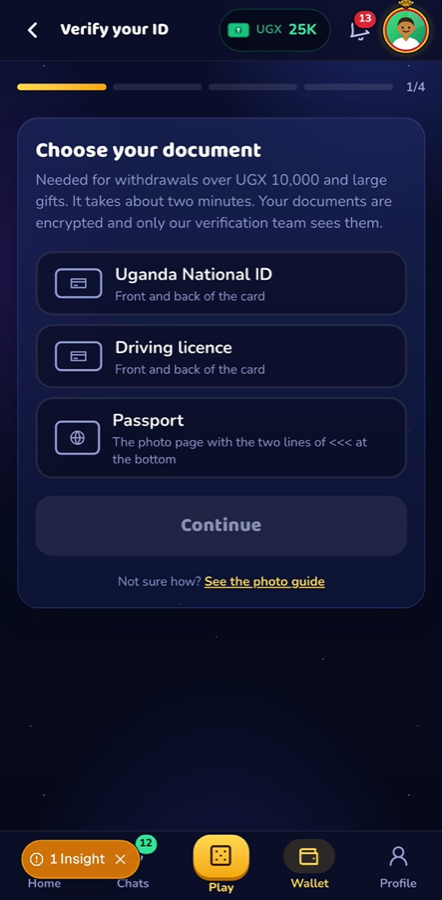
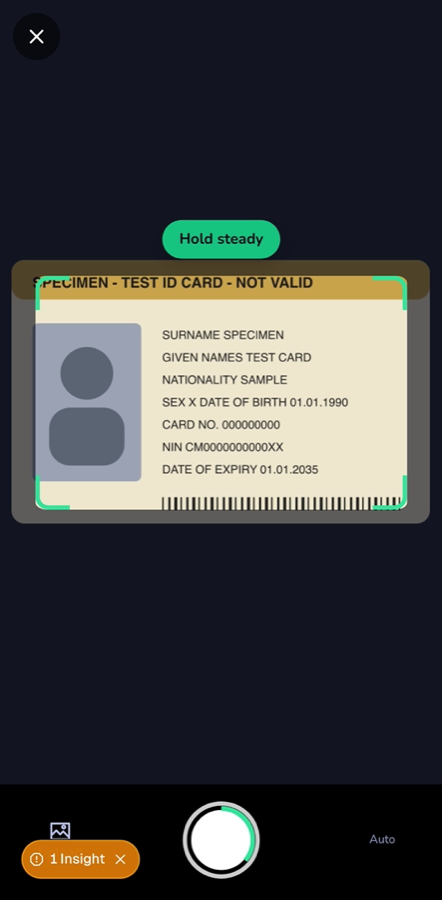
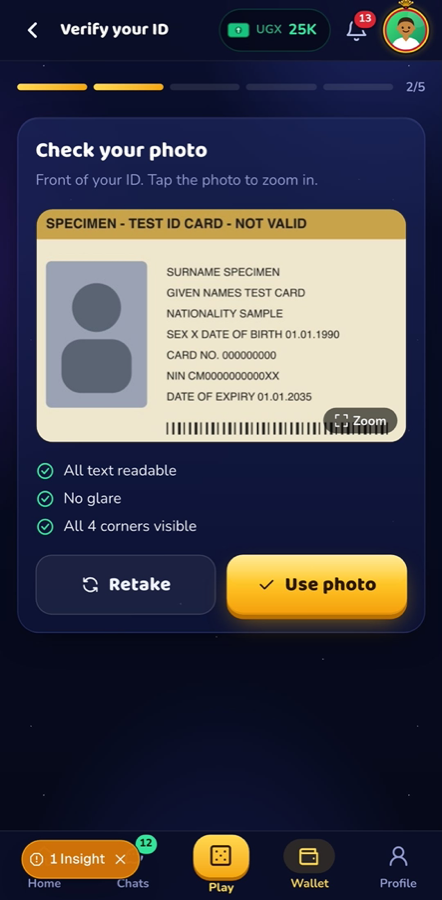
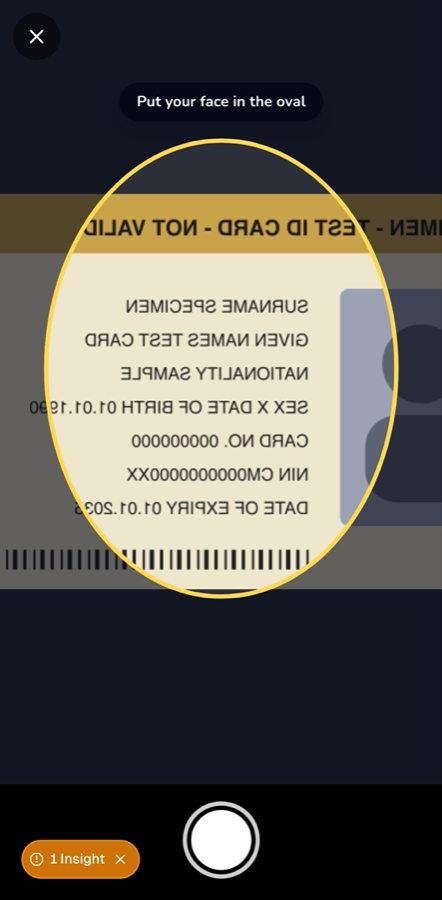
- 1Open Wallet, then Verify your IDIn the app go to Wallet and tap Verify your ID. Reminders and notifications open the same page.
- 2Choose your document and enter its numberPick National ID, driving licence or passport and type the number exactly as printed.
- 3Allow the cameraWe ask for the camera only on this step and only to take these photos. If you said no before, allow the camera for ludocasharena.com (or the Ludo Cash Arena app) in your phone settings, or upload photos instead.
- 4Fit the card in the frameHold the card inside the card-shaped frame. The app checks light, sharpness and glare and takes the photo by itself when everything looks good. You can also press the shutter button.
- 5Check the photoZoom in and make sure all the text is readable, there is no glare and all 4 corners are visible. Tap Retake if not, or Use photo.
- 6Turn the card overFor a National ID or driving licence, do the same for the back.
- 7Take a selfiePut your face in the oval, then turn your head slightly left and then right when asked.
- 8SendCheck everything once more and send it. Our verification team reviews it, usually within a few hours, and you get a notification with the result.
How to take a good ID photo
- Good, even lightDaylight near a window or a bright room. Avoid strong lamps right above the card.
- A dark, plain surfaceLay the card flat on a dark table or cloth so its edges stand out.
- No glareIf you see a white shine on the card, tilt it slightly or move away from the light.
- All 4 corners in the frameNothing cut off. Fill most of the frame, but leave a little space around the card.
- Hold steadyRest your elbows on the table. Wait a moment for the camera to focus.
- Fingers off the cardDo not cover any text, the photo or the corners.
- The real card onlyNo photocopies, scans, screenshots or photos of a screen. They are flagged and usually rejected.
The selfie
- Face the light; do not stand with a bright window behind you.
- Take off hats, sunglasses and face masks. Glasses are fine if your eyes are visible.
- Only you in the picture.
- Hold the phone at eye level, about an arm's length away.
The head-turn check
After the selfie the app asks you to turn your head slightly left and then right, and keeps 2 or 3 frames. This is a basic check that a real person was in front of the camera at that moment. It is not a certified liveness test: a person on our team still compares your selfie with the photo on your ID.
On a computer
On a computer you can use the webcam or upload photos you took with your phone. The easiest way is to open Ludo Cash Arena on your phone and verify there.
Your privacy and why we ask
- Your photos are encrypted when stored and are never public. Only our verification team can open them, and every view is logged.
- We remove hidden photo data (such as location and camera details) when you upload.
- We ask because cash play is for players aged 25 and over, so your first withdrawal needs an approved ID that confirms your age, and because anti-money-laundering rules require us to know who receives withdrawals and gifts.
- The Privacy Policy and the AML and KYC policy explain how long we keep documents and your rights.
Read the Privacy Policy and the AML and KYC policy.
What happens next
- Verified: withdrawals and gifts are open to you, and the deposit limit for unverified players no longer applies. You never need to verify again.
- Asked to retake: we tell you exactly which photo (front, back or selfie) and why. Only that photo needs to be taken again.
- Not verified: the notification says why. Fix it and send again.
Common problems and fixes
- Blurry
- Hold still, rest your elbows and wait a moment: the app takes the photo when it is sharp.
- Glare
- Tilt the card slightly away from the light or turn off the lamp above it.
- Cut off
- Move the phone back a little so all 4 corners are inside the frame.
- Too dark
- Move to a brighter place or near a window during the day.
- Expired document
- Use a valid ID. If your National ID has expired, use your passport or driving licence.
- Photo of a screen or a copy
- Take the photo of the real card, not of a scan, a photocopy or another phone.
- Name does not match
- The name on the ID must match your account. If your account name is wrong, contact support first.
- Under 18
- Ludo Cash Arena is for adults aged 18 and over; cash play and verification are for players aged 25 and over.
Ready?
Have your document ready and find a bright spot.